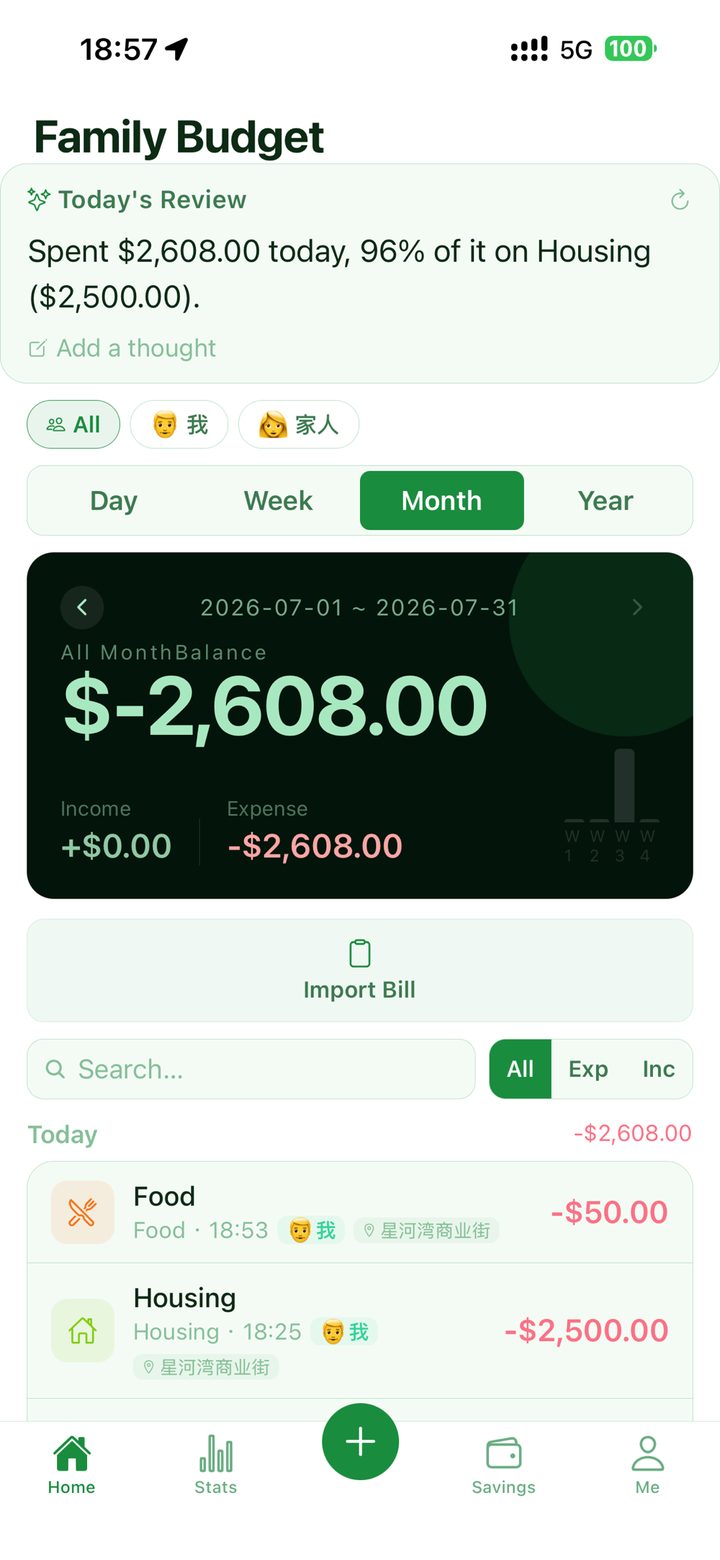
Most money arguments at home are not about money, they are about not knowing. Fambook gives a household a single ledger: anyone can add an entry in a few seconds, every entry says who it was, and at the end of the month there is one set of numbers instead of two versions of events.
iPhone and iPad · free to use · records offline, syncs when you have signal
1shared ledger
2taps to the keypad
9interface languages
CSVin and out, free
The screens the household shares
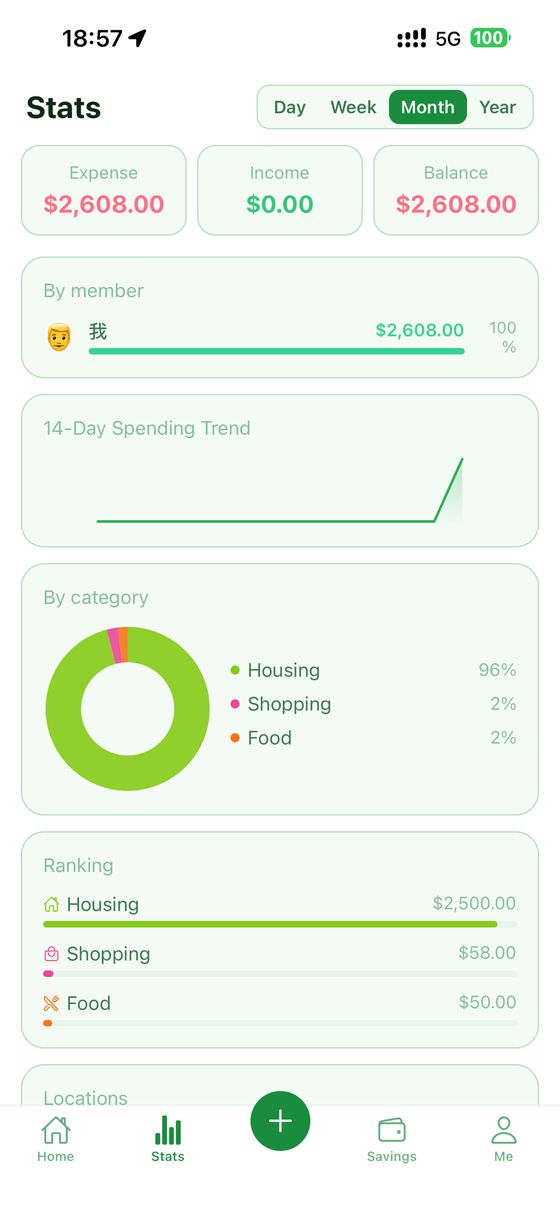
The month, split by member and by category.
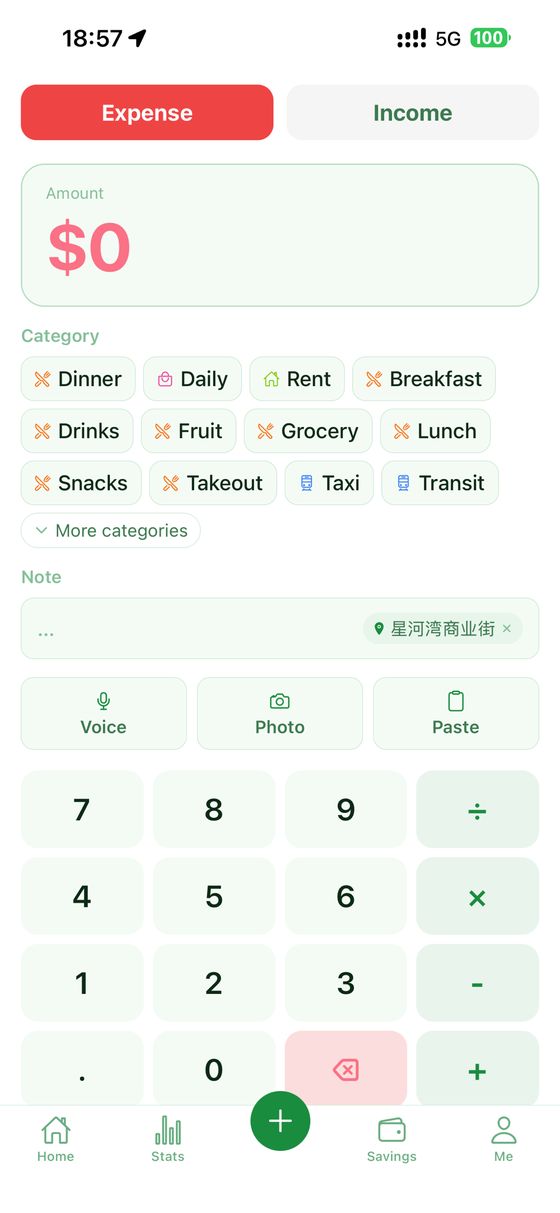
The keypad is the screen. Amount, category, done.
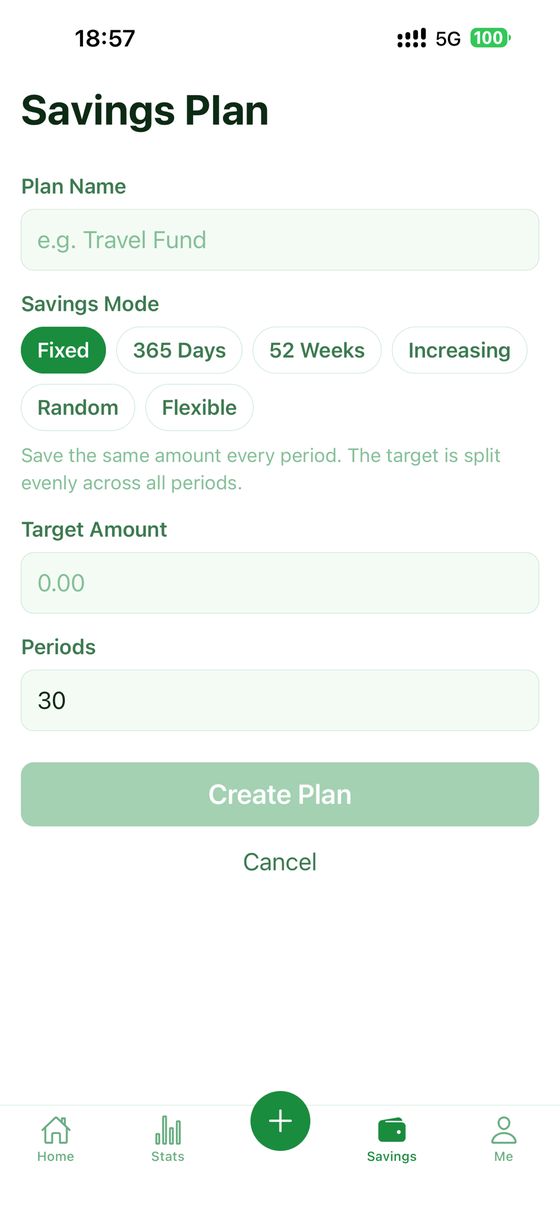
Savings plans that write real entries, not counters.
What you actually get
A ledger the household shares
One person creating an invite code and another entering it is the whole setup. From then on you are writing into the same book: the same entries, the same monthly total, the same category breakdown, on both phones. What does not happen is a merge of your history — the entries you made before you joined stay yours and are not poured into anybody else’s book, which is a deliberate decision in the query layer rather than an oversight.
Every entry says who
A household is not one wallet. Each entry carries a family member, with a colour and an avatar, and the statistics screen will break the month down by person as readily as by category. This is the part that ends the "we spent how much?" conversation, because the answer stops being a single number that nobody recognises and becomes a picture both people can point at.
Entering something takes seconds
The keypad is the screen, not a form you fill in. Amount, a category tapped once from a flat list rather than dug out of a menu tree, and you are done — member, date, time, note and place are all optional and sit within reach. The keypad also does arithmetic, so a bill you are splitting three ways can be typed as the sum and left as the sum.
Categories that rearrange themselves
Two levels, both laid out flat so a tap gets you there. They start in an order based on how often a household typically records each kind of thing rather than on how much it costs — rent is the second largest number in most budgets and gets entered twelve times a year, so it does not deserve a spot under your thumb. After a few weeks the order follows your own entries instead of the default, and you can add, rename, reorder and delete whatever you like.
Limits you see while you are typing
Set a monthly limit on a category and what you have left is visible where the decision is being made, not buried in a report you read after the fact. The bands are plain: on track, close, over. No score, no grade, no advice about lattes.
Statistics that answer real questions
Expense, income and balance for the period. The top categories as a donut, with the long tail merged rather than shattered into slices nobody can read. A fourteen-day trend. A breakdown by family member, and one by place, so "where does it go" has an answer with streets in it.
Savings plans that can be honest
The 365-day and 52-week challenges are here, plus a custom one, with a progress bar and a run of check-ins. They are check-ins, though, and a check-in is not money — so there is a switch that also writes each one into the ledger as a real entry. It is off until you turn it on, and it is the difference between a counter and a savings account.
It records with no signal
An entry is written to the phone first and pushed to the cloud afterwards. Underground, abroad, in a basement restaurant: you record, and the app carries the backlog until there is a network. Anything still waiting is shown as a count on the home screen rather than hidden, and a copy coming down from the cloud is never allowed to overwrite a change you have made but not yet uploaded.
Bring your ledger, and take it away again
Import a CSV out of whatever you used before: the columns are guessed, amounts and dates are normalised, both UTF-8 and GB18030 files are read, and each row is fingerprinted so importing the same file twice does not double your March. Export is the same door in reverse, to CSV, through the iOS share sheet. Both are free and are staying free.
Optional help with the typing
Point the camera at a receipt, paste the message your bank sent, or say what you spent — and the amount and a category come back filled in for you to check before saving. This is the paid part of the app, it is genuinely optional, and every one of its failure paths lands you back at the keypad rather than at an error.
Six themes, nine languages
Forest, WeChat green, sakura, pure, volcano and shiba, each with a full light and dark set; leave it on system and it follows the phone. The interface is in English, 简体中文, 繁體中文, 日本語, 한국어, Español, Français, Deutsch and Português (Brasil).
One step out
Delete your account, and its data with it, from inside the app — not by writing to support and waiting. Export first if you want to keep a copy; the button is right there and it does not cost anything.
How it works
The useful version of this app is running inside about five minutes. There is nothing to configure first.
Make an accountEmail and a code, or Sign in with Apple. An account exists because the ledger is shared and has to reach a second phone; it is not there to build a profile of you.
Record three real thingsNot a test entry. The coffee this morning, yesterday’s groceries, the taxi. Three real entries tell you within a minute whether the keypad suits your hands, which is the only thing that decides whether an expense tracker survives week two.
Invite whoever else spendsFrom the members sheet: create an invite code, send it however you normally send things, they enter it. Both phones are now on the same book. The free tier covers a two-person household.
Set one limit, not sevenPick the category you actually argue about — usually food — and give it a monthly number. One limit that you look at beats six that you stop looking at.
Read the month at the end of itStatistics, one period, five minutes. Where it went by category, by person and by place. The point is one or two decisions for next month, not a verdict on the last one.
If you have a ledger somewhere else, import the CSV before you start, so the first month you look at has something to be compared against.
Where your data actually is
Fambook is a synced app and it would be dishonest to imply otherwise. Every entry is written first to a database on your own phone, and then uploaded to Fambook’s server, which runs on Supabase. That upload is what lets your partner see the entry you just made and what gets your ledger back after you lose or replace your phone.
Access to those rows is enforced by the database itself, not by the app being polite: a row can be read by the account that created it and by the household it belongs to, and by nobody else. Joining a household is deliberate on both sides — someone creates a code that expires, you enter it — and every operation that crosses between accounts happens on the server, because the app on your phone is not given the ability to write into another household at all.
Joining does not hand over your past. Entries you made before you joined stay attached to you and are not merged into the shared book, and leaving a household does not take your history with it.
The AI features are the only place anything is sent to a company other than us, and they only run when you press the button. A receipt photo, a pasted bank message or the text of what you said is forwarded to a model provider to have the amount and category read out of it; the reply comes back, you check it, and the photo is not stored — there is no table in the app that holds an image. Speech is turned into text by iOS on your phone; the audio is not uploaded. If you never touch those three buttons, nothing goes to a model provider.
Location, if you allow it, is used to suggest a place name for the entry you are writing at that moment. It is a suggestion until you tap it, and what is saved is a name like a street or a shop, attached to that entry.
Your data is yours to remove and yours to keep. Export the whole ledger to CSV whenever you like — free, and it will stay free, because an app you cannot leave is a trap. Deleting your account, and its data, is one step inside the app.
What costs money
Recording, categories, budgets, statistics, savings plans, import, export, cloud sync and family sharing for a two-person household are free, and are meant to stay that way. That set is a complete household expense tracker; nothing about it is a trial.
The subscription adds the things that save typing rather than the things that make the app work: reading a receipt photo, parsing a pasted bank message, voice entry, recurring entries, the AI version of the daily summary, and a household larger than two people. Monthly, yearly and lifetime are offered, at whatever the App Store shows in your country.
What is not here: adverts, a data-selling business, a free tier that stops working after a month, or a paywall in front of your own export.
No. The subscription is on an account, and the free tier already covers a two-person household with sharing, sync, budgets and statistics included. If one of you subscribes for the receipt scanning, the other is not locked out of the ledger.
Can my partner see everything I record?
Everything you record into the shared household, yes — that is what a shared book means. Entries you made before you joined are not merged into it and stay yours. If you want something kept separate, keep it out of the household rather than expecting the app to hide it.
Does it connect to my bank?
No. There is no bank connection and no card link, so nothing about your accounts is ever handed over. What it can do is read the message your bank already sent you if you paste it in, which gets most of the same convenience without the credentials.
What happens to entries I make with no signal?
They are saved on the phone immediately and pushed later. The home screen shows how many are still waiting, and if you edited something offline, the copy on the server is not allowed to overwrite it when you reconnect.
Is my receipt photo stored anywhere?
No. It is sent to be read for the amount and category and the reply is what you keep. There is no image column in the app’s database, so there is nowhere for the picture to live.
Can I get my data out?
Yes, to CSV, from inside the app, for free, at any time. This is not a feature we would put behind a subscription: being able to leave with your own records is the thing that makes it reasonable to start.
Is there an Android version, or a web version?
Not at the moment. Fambook is an iPhone and iPad app.
How do I delete everything?
One step in the app deletes the account and the data with it. Export first if you want a copy — once it is gone, we cannot get it back for you.